How to remove the OneNote Badge Stay from Android notification tray?
2019-11-26 15:08
Question:
How do I get rid of the OneNote icon from Android notification area?
How do I get rid of the OneNote icon from Android notification area?
Answer:
When the OneNote badge is running, it adds a notification to the notification tray so that you can launch the OneNote badge directly from the notification tray without leaving the current application. If you wish to disable the notification, you can turn it off.
1. Open OneNote and click the overflow menu
When the OneNote badge is running, it adds a notification to the notification tray so that you can launch the OneNote badge directly from the notification tray without leaving the current application. If you wish to disable the notification, you can turn it off.
1. Open OneNote and click the overflow menu

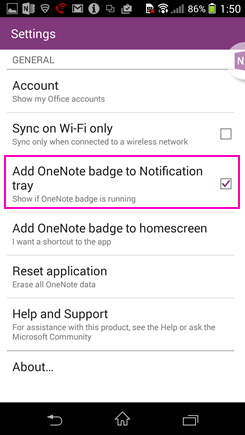
2. Choose Settings.
3. In Settings, clear the check box next to Add OneNote to Notification tray.
3. In Settings, clear the check box next to Add OneNote to Notification tray.
Related Documents
- How to View Sync Error Messages in Android OneNote?
- Deleting sections and pages in Android OneNote will permanently remove them and cannot be recovered
- How to fix the official Android OneNote 16.0.19127.20224 in 2025 often not syncing?
- Android OneNote support will be limited to only the last 4 major versions of Android
- How to Fix Android OneNote Cursor Jumps to the Beginning of the Line after Bracket?

