
OneNote not guarantee that content will not be lost
2020-12-18 14:30
OneNote occasionally loses content because it doesn't provide an automatic backup mechanism like Word.
Actions that are found to cause content to be lost:
Like follow Microsoft error reporting:
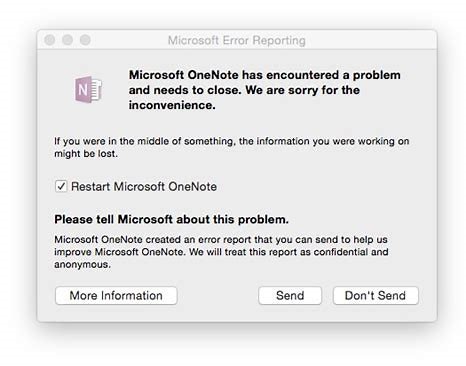
From the error prompt in the OneNote window above, Microsoft OneNote does not obscure the loss of notes.
That is, Microsoft also knows that it will lose the contents of the notes, but there is no better mechanism to ensure that the content is not lost.
Actions that are found to cause content to be lost:
- When you cut pages or cut sections, you may lose them.
- When you modify the section name, you may lose it.
- When you drag a section, it may be lost.
- When you drag a page, you may lose it.
- When OneNote crashes, it may be lost.
Like follow Microsoft error reporting:
Microsoft OneNote has encountered a problem and needs to close. We are sorry for the inconvenience.
If you were in the middle of something, the information you were working on might be lost.
From the error prompt in the OneNote window above, Microsoft OneNote does not obscure the loss of notes.
That is, Microsoft also knows that it will lose the contents of the notes, but there is no better mechanism to ensure that the content is not lost.
Related Documents
- 2026.6 Mac OneNote v16.109 Custom Tags Panel Renders Blank
- 2026.7.13 Older Versions of OneNote on macOS, iPad, and iPhone will become Read-Only
- Adjust the Mac OneNote Vertical tab layout to Horizontal tab layout
- How to open a local section .one file in Mac OneNote?
- Blank Screen or Loading Spinning after Input MS Account and Click Next in Mac OneNote 16.16 Sign In

