OneNote 2010: An error occurred while attempting to sync this section or notebook. (Error code: 0xE000003D)
2019-11-26 16:04
Question:
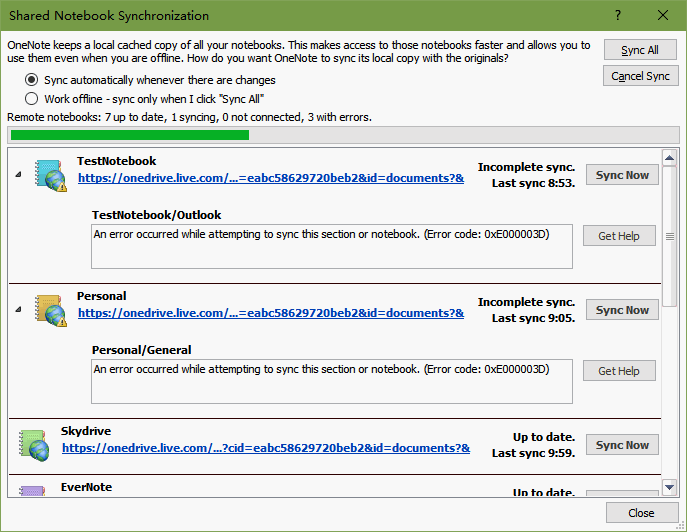
2017.4, In OneNote 2010, If I edit any page in the OneNote App on Windows 10, the Section will no longer sync to Office 2010 (via OneDrive). All give the following error:
An error occurred while attempting to sync this section or notebook. (Error code: 0xE000003D)
2017.4, In OneNote 2010, If I edit any page in the OneNote App on Windows 10, the Section will no longer sync to Office 2010 (via OneDrive). All give the following error:
An error occurred while attempting to sync this section or notebook. (Error code: 0xE000003D)
Reason:
This is maybe 2017 March update to OneNote App (OneNote 17) or Android OneNote, Any edited in the OneNote App on Windows 10, the section will catch 0xE000003D error when syncing in OneNote 2010.
After OneNote 17 or Android OneNote in 2017 March, it will catch this error.
Solution:
There is still no solution.
This is maybe 2017 March update to OneNote App (OneNote 17) or Android OneNote, Any edited in the OneNote App on Windows 10, the section will catch 0xE000003D error when syncing in OneNote 2010.
After OneNote 17 or Android OneNote in 2017 March, it will catch this error.
Solution:
There is still no solution.
| EXE Addins | Cloud Addins | MAC Addins |
Related Documents
- Office OneNote v2606, v2607 freezes when switching to normal pen drawing, and the drawn shapes will appear after respond
- OneNote v2604 Changed the Copy function Ctrl+C from Image format to Plain Text Format
- How to setup the Quick Notes section of OneNote?
- How to fix the OneNote notebook pane fills the entire window and flickering when Collapse Sidebar?
- 2026.3.20 OneNote cannot login today: It doesn't look like you're connected to the Internet. 0x800704cf [Fixed]

