Search
OneNoteGem
  • Home
  • Addins
    • Windows Office Addins >
      • Gem for OneNote
      • OneNote Search Bar
      • OneNote Gem - Favorites
      • OneNote Batch
      • Pons for MindManager and OneNote
      • Mind Map for OneNote
      • Pons for Visio and OneNote
      • Row to OneNote
      • Auto OneNote
      • Favorite to OneNote
      • Bridge for EndNote and OneNote
      • Anchor to OneNote
      • Anchor to OneNote for PDF
      • Bring to OneNote
      • Gem Table for OneNote
    • Windows Cloud Addins >
      • CiteBoard for OneNote
      • OneReader
      • OneMind for Web OneNote
      • OneNote Reminder Cloud
      • OneNote Batch Cloud
    • Mac Addins >
      • Gem Menu for Mac OneNote
      • CiteBoard for OneNote
      • Bring to Mac OneNote
      • OneMind for Mac OneNote
      • OneNote Reminder for Mac
      • OneNote Batch for Mac
      • Fix One for Mac - Fix OneNote Login, Sync Tools
    • Android Addins >
      • CiteBoard for OneNote
      • Fix One for Android - Fix OneNote Login, Sync Tools
    • Cross-Platform Addins >
      • OneNote Reminder
      • OneMind for OneNote
      • CiteBoard for OneNote
      • Fix One - Fix OneNote Login, Sync Tools
    • Markdown Addins >
      • Gem for OneNote
      • One Markdown
    • Mind Map Addins >
      • OneNote Gem - Favorites
      • Pons for MindManager and OneNote
      • Mind Map for OneNote
      • Pons for Visio and OneNote
      • OneMind for OneNote
    • Other Addins >
      • Gem Menu for OneNote UWP
      • One Markdown
      • Clip to OneNote
      • WordNote
      • OneShare
      • Fix One for Windows - Fix OneNote Login, Sync Tools
      • OneNote for Windows 10 Reviver - UWP Reviver
  • Buy
  • Documents
  • FAQs
  • Templates
  • Support
  • Release
  • WordNote
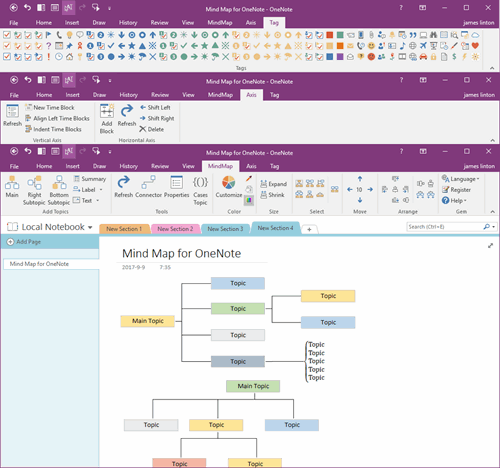
Mind Map for OneNote
 
 
Using OneNote native elements to create Mind Map

How to disable Copilot in Office OneNote?

2026-09-21 07:01
 
On August 12, 2026, after Office OneNote 365 upgraded to v2609, Copilot Notebooks functionality was added.
 
At the same time, this Copilot Notebooks feature is enabled by default.
 
However, many people's OneNote notes are private. If private notes were made public to AI, it could have disastrous consequences.
 
We must disable this feature in time. Whether or not the AI is in a sandbox.
 
When Copilot Notebooks is enabled, opening OneNote will show "Copilot Notebooks" in the notebook tree pane.
 

Steps to disable Copilot Notebooks:

OneNote -> "File" tab -> Options -> "OneNote Options" window -> Copilot -> "Use Copilot" group -> Uncheck "Show Copilot Notebooks in the Notebook list.
 
After unchecking the box, the "Copilot Notebooks" in the notebook tree pane will disappear.
Click to View all Content
 
EXE Addins Cloud Addins MAC Addins

Related Documents

  • Office OneNote v2509 add an Option to Show/Hide Copilot Icon
  • Use OneNote Copilot to Recognize your Handwriting
  • 2025.2 OneNote scheduled to add "Enable Copilot" checkbox to turn Off Copilot
  • Why is the OneNote “Make subpage” menu item grayed out, disabled, and unclickable?
  • How to Disable Pop up Tablet PC Input Panel on OneNote Pages when Handwriting?
Command Line
Tag System
MindMap Add-Ins Comparison
Search Add-Ins Comparison
One Markdown Syntax
Table Formula
Gantt

Gem Menu Templates
Repair OneNote
OneNote Download
English website Chinese website
Mobile Site
Copyright © 2011-2026 Digital GemSoft. OneNoteGem.com All Rights Reserved.